
Article
Watcher: Auto-Hash Files the Moment They Change
6 min read
What Is Watcher?
Watcher is a new feature in e-Dex that does something delightfully simple: you point it at a folder, and it auto-hashes files on change. The instant a file is created, modified or deleted inside that folder, Watcher records the event together with a timestamp and a fresh cryptographic hash. You will find it under the Classic tab → Watcher. Instead of stopping to hash a file by hand every time you want to confirm its state, you let Watcher keep a running record for you. It turns a manual, one-off check into a continuous, hands-off integrity log for everything that lands in the folder you care about.
Why Continuous Hashing Matters
A hash is only as current as the last time you computed it. If you hash an evidence file on Monday and someone alters it on Wednesday, a manual checkpoint will not notice until you next remember to re-hash. The change could sit undetected for days. Continuous hashing closes that gap. By hashing files the moment they change, Watcher catches tampering, accidental edits and silent corruption as they happen, not at some later checkpoint that may never come. In effect it gives you a lightweight file-integrity monitor: a quiet observer that keeps a timestamped trail of every write to your folder. That trail is exactly what you need when the question later becomes "was this file touched, and if so, when?" For the bigger picture on why this matters, see our guide to tamper-evidence in digital forensics.
How It Works
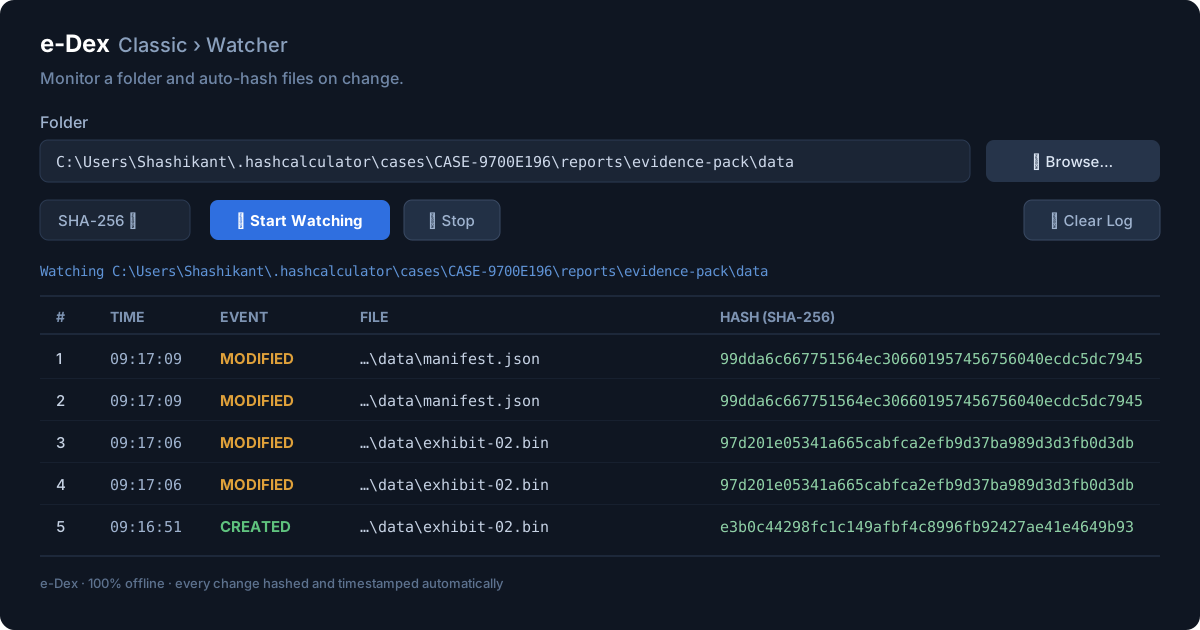
Watcher is built around one clear screen. You Browse to pick the folder you want to monitor, then choose an algorithm — MD5, SHA-1, the SHA-2 family (224, 256, 384, 512 and 512/256), or SHA-3. Click Start Watching and the live log begins to fill. Each entry records a row number (#), the Time the event occurred, the Event type (CREATED, MODIFIED or DELETED), the File path, and the new Hash for that file. You can Stop watching whenever you like, or Clear Log to start a fresh record. Everything happens locally — Watcher reads the files, computes the hash on your machine, and writes the result straight into the on-screen log.
A Walkthrough: Start Watching a Folder
Getting started takes under a minute. Follow these steps:
- Open Watcher. Launch e-Dex, switch to the Classic tab and select Watcher.
- Pick a folder. Click Browse and choose the folder you want to keep an eye on.
- Choose an algorithm. Select your hash — SHA-256 is a solid default; pick SHA-512 or SHA-3 for extra margin.
- Start watching. Click Start Watching to begin live monitoring.
- Read the log. Watch each CREATED, MODIFIED or DELETED event appear with its time and hash. Use Stop or Clear Log whenever you need.
Real-World Uses
Watcher earns its keep wherever change matters. Point it at an evidence or case folder so that any addition or edit is logged with a fresh hash — a natural companion to a documented DFIR hash-verification workflow. Monitor a build or output directory so you can prove exactly which artifacts were written and when. Spot unexpected writes to a "frozen" dataset that is supposed to stay untouched. Or simply feed a running integrity record that complements a file hash manifest — the manifest captures a baseline, Watcher captures everything that changes afterward.
How It Fits Evidence Integrity
Watcher is one piece of a larger integrity story. The live log pairs naturally with chain of custody notes and with e-Dex's tamper-evident certificates: the certificate proves a file was in a known state at a known time, while Watcher shows the timeline of changes around it. Because everything runs 100% offline with nothing uploaded, you can run Watcher on sensitive material without it ever leaving your machine — exactly what you want when handling confidential or evidentiary data. To see how this slots into wider obligations, read our overview of file-integrity compliance.
Limitations and Notes
It is worth being precise about what Watcher is and is not. It records change events and their hashes for a single folder on a single machine — a lightweight, practical integrity monitor. It is not a full enterprise file-integrity monitoring (FIM) platform with centralized policy management, fleet-wide alerting or cross-server dashboards. Think of it as the right tool for an investigator, auditor or engineer who needs an honest, timestamped log of what happened to one important folder — not as a replacement for a managed security suite across hundreds of hosts.
Frequently Asked Questions
What is the Watcher feature in e-Dex?
Watcher is a tool inside e-Dex, found under the Classic tab, that monitors a folder you choose and
automatically hashes files the moment they change. Each time a file is created, modified or deleted in the
watched folder, Watcher records the event with a timestamp and a fresh cryptographic hash in a live log, so
you have a continuous integrity record without doing anything by hand.
Which hash algorithms can Watcher use?
Watcher supports the full range of algorithms in e-Dex: MD5, SHA-1, the SHA-2 family (224, 256, 384, 512
and 512/256) and SHA-3. You pick the algorithm before you start watching, and every event in that session
is hashed with your chosen algorithm. SHA-256 is a sensible default for most integrity work.
Does Watcher upload my files anywhere?
No. e-Dex and its Watcher run entirely offline on your own Windows machine. Files are read and hashed
locally, the event log stays on your computer, and nothing is uploaded to any server. That makes Watcher
suitable for sensitive evidence, case folders and confidential datasets.
Is Watcher a full enterprise file-integrity monitoring platform?
No. Watcher is a lightweight, single-machine file-integrity monitor that records change events and hashes
for a folder you choose. It is ideal for watching an evidence folder, a build output directory or a frozen
dataset, but it is not a centralized, multi-host enterprise FIM platform with policy management, alerting
and dashboards across a fleet of servers.
How do I stop or reset the Watcher log?
At any time you can click Stop to pause monitoring, or Clear Log to empty the on-screen event list and
start fresh. Stopping the Watcher ends the live session without affecting the files in the folder; the
hashes already recorded remain visible until you clear them or close the session.
Conclusion
Watcher turns hashing from a thing you remember to do into a thing that simply happens. Point it at a folder, choose an algorithm, click Start Watching, and you get a timestamped, hash-stamped record of every change — all offline, all on your own machine. It is a small feature with an outsized payoff for anyone who needs to prove what happened to a file and when. Ready to try it? Download e-Dex for free and start watching your first folder today.
Streamline Your Business with Planex365 ERP
Consolidate your sales pipeline, CRM contacts, inventory, accounts receivable, and billing in a single, secure database designed for Indian SMEs.
Related on e-Dex
File-Integrity Compliance · Free Hash Tool · Verify a Certificate · Download e-Dex (free)